Month-End Close for Multi-Location Plantations: 7 Accounting Challenges and How to Solve Them
In a plantation group, the books cannot close until every estate, mill and office has finished its records, and one late location holds up the whole company. This guide explains the seven accounting challenges behind a slow close and what a good closing system must do about them.
Key takeaways
- Multi-location close fails on unfinished field data, open documents and late payroll, not on the journal itself.
- Close each location first, then run cost allocation, then close the company.
- Automatic checks with direct links to the problem documents replace spreadsheets and chasing by phone.
- Locking a closed location stops back-dated changes that break reported figures.
7 accounting challenges in a multi-location close
Accountants rarely struggle with the closing journal itself. The work is in making sure every location’s data is complete and correct before the period is locked.
- Field data arrives late: attendance, harvest, BKM, census and inspection records from phones are still waiting for review at month end, so labour and harvest costs are incomplete.
- Open documents everywhere: purchase invoices, cash payments, advances, stock issues, transfers and contractor reports sit in draft or approved-but-unposted status across many locations.
- Payroll not finished: estate payroll with premiums, deductions, BPJS and PPh 21 must be posted before labour costs reach the ledger.
- Inventory and fuel do not match: stock issues, inter-location transfers, fuel and vehicle logbooks must be complete before materials and vehicle costs can be charged to blocks and activities.
- Cost allocation depends on everyone: shared costs such as workshops, vehicles, overheads and mill costs can only be allocated after every location is complete.
- Inter-location and inter-company balances: head office and estate accounts (R/K) and transactions between companies must agree before consolidation.
- Changes after the close: if nobody locks a closed period, back-dated entries change figures that management has already reported.
7 features of a good period-close system
A good ERP turns the closing checklist into something the system enforces.
- Close per location, then per company: each estate, mill or office closes its own period; the company closes only when all locations are done.
- Automatic mandatory checks: the system checks pending field submissions, unposted documents, payroll status and more, and blocks the close while mandatory checks fail.
- Direct links to the problem: every failed check shows how many documents are affected and opens them directly.
- Status per location: finance sees at a glance which locations are open, checked, held or closed.
- Locking: a closed location’s modules are locked so the figures stay as reported.
- Built-in cost allocation: allocation rules run as a step between location close and company close.
- Reconciliation and consolidation: inter-location, inter-company and accrual reconciliation, then consolidation for the group.
Benefits of a structured close
When the system enforces the close, finance spends less time chasing and more time reviewing.
- Faster close: problems are found during the month, not on the last day.
- Complete costs: field, payroll, inventory and vehicle costs are all in before allocation.
- Reliable reports: locked periods mean the numbers management sees do not change later.
- Clear responsibility: each location knows exactly what blocks its close.
- Audit-ready: checks, approvals and data changes are recorded.
How to organise your monthly close
Use the same order every month.
- Set a calendar: agree cut-off dates for field data, payroll, purchasing and inventory per location.
- Run checks early: run the closing checks mid-month and again before cut-off.
- Close locations: fix failed checks, then close each estate, mill and office.
- Allocate costs: run cost allocation once all locations are closed.
- Close the company and consolidate: close each company, reconcile inter-company balances and run consolidation.
Period close in Symphony: all these features, and more
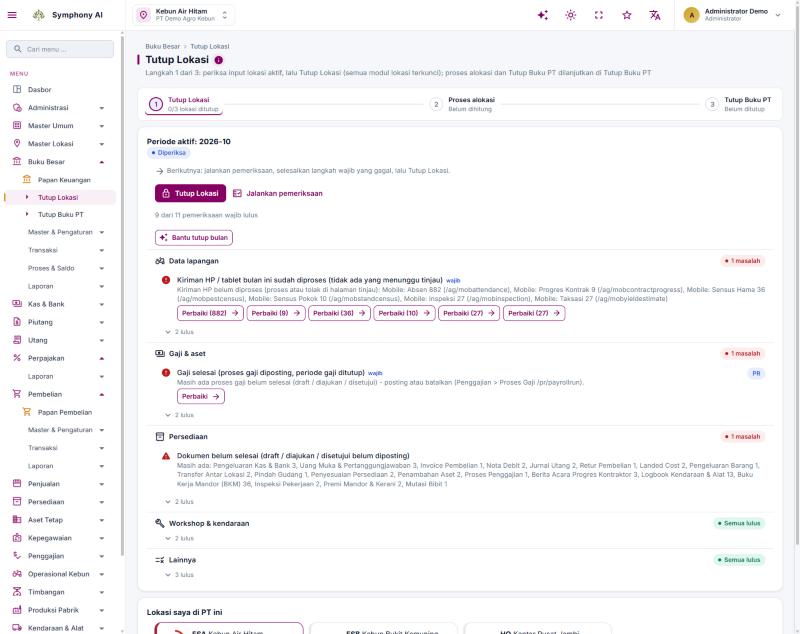
Symphony ERP already runs the close in three steps: Close Location, cost allocation, and Close Company.
- Mandatory checks per area: field data (mobile submissions awaiting review), payroll and assets, inventory and open documents, workshop and vehicles, and others, with “X of Y mandatory checks passed”.
- Fix buttons: each failed check shows the number of affected documents and opens them directly, for example pending mobile attendance, BKM, vehicle logbooks or unposted invoices.
- Status per location: open, checked, held or closed for every estate, mill and office in the company.
- Locking: closing a location locks all of its modules for that period.
- AI month-end assistant: the “Help with month-end close” button explains check results as ordered follow-up actions. AI needs activation, uses the company’s monthly quota and never closes or posts by itself.
- Beyond the close: cost allocation rules, inter-location (R/K) and inter-company monitoring, accrual reconciliation, audit adjustments, currency revaluation, consolidation, approval rules and a full audit trail of data changes.
Take this to your next close
- List the documents and data that delayed your last close.
- Agree cut-off dates per location.
- Run closing checks mid-month.
- Close locations before running cost allocation.
Common questions
Why close per location before closing the company?
Because shared costs and inter-location balances can only be calculated correctly once every location’s data is complete and locked.
What usually delays the close the most?
Unreviewed field data and documents left in draft or approved-but-unposted status, spread across many locations.
Does AI close the books automatically?
No. AI explains check results and suggests the order of follow-up. Closing, posting and approvals stay with authorised users.
See the finance module, period close and consolidation, and discuss how they fit your group.
View finance module →