Plantation Procurement System: 7 Features for Centralised and Local Purchasing
Fertiliser, chemicals, mill spare parts and vehicle parts are bought for many estates at once, sometimes by head office and sometimes by the estate itself. This guide explains what a good plantation procurement system needs so buyers know exactly which requests are theirs and nothing gets stuck.
Key takeaways
- Decide per item group who buys: head office centrally, or each location itself.
- Assign every item group to a buyer team so each request lands with the right person.
- A purchasing board shows the whole flow from request to invoice, with urgent and overdue items first.
- Lead times from request to PO and from PO to receipt show where purchasing slows down.
Why plantation procurement is hard
Purchasing in a plantation group serves many estates, mills and offices with very different needs.
- Central or local: fertiliser and mill parts are usually bought by head office, while small daily needs are bought by the estate.
- Many buyers, unclear ownership: without clear assignment, requests wait because nobody knows whose job they are.
- Urgent needs: a broken press or a fertiliser round cannot wait for a slow approval chain.
- No overview: managers cannot see how many requests are waiting, which POs are late and what has been received but not invoiced.
7 features of a good plantation procurement system
These features make sure every request has an owner and every step is visible.
- Purchasing organizations: define who buys: each location for itself, or centrally from a buying location such as head office, serving one or more companies.
- Purchasing groups: buyer teams with their own purchasing organization, buyers and the item groups they handle, such as fertiliser and chemicals, mill parts or vehicle parts.
- Automatic routing: a request goes to the right purchasing group based on its item group.
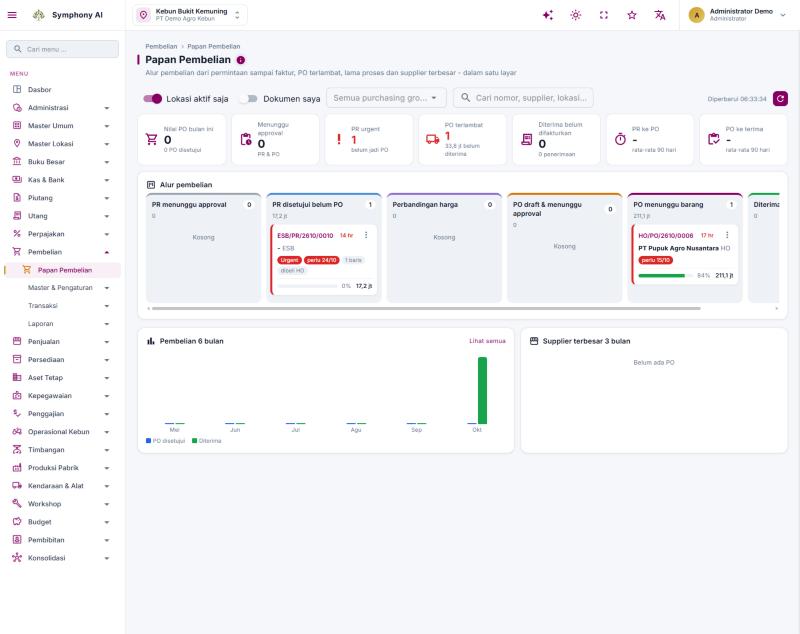
- Purchasing board: one screen with the full flow: requests awaiting approval, approved requests without a PO, price comparison, POs awaiting approval, POs awaiting goods, and received-not-invoiced.
- Urgent and overdue first: urgent requests and overdue POs are highlighted with their value and age.
- Lead-time measurement: average days from request to PO and from PO to receipt.
- Linked to inventory, budget and finance: receipts update stock, and invoices and payments follow the same documents.
Benefits for the purchasing team
Clear structure means buyers spend time buying, not searching.
- Clear ownership: each buyer sees only the requests for their item groups.
- Faster response to urgent needs: urgent requests are visible immediately.
- Fewer late deliveries: overdue POs are followed up before they stop the field or the mill.
- Better negotiation: centralised buying combines the needs of several estates and companies.
- Complete control: management sees value, status and suppliers on one screen.
How to set up procurement in your ERP
Start from how your group actually buys today.
- Map who buys what: list item groups and decide which are bought centrally and which locally.
- Create purchasing organizations: one per buying model, with the buying location and the companies it serves.
- Create purchasing groups: assign buyers and item groups to each team.
- Set approval rules: agree approval limits per document and value.
- Review the board weekly: follow up urgent requests, overdue POs and receipts without invoices.
Procurement in Symphony: all these features, and more
Symphony ERP already organises purchasing with purchasing organizations, purchasing groups and a purchasing board.
- Purchasing Organization: set as “own location” or “centralised” with a buying location (for example head office) and the companies it serves.
- Purchasing Group: each group has its purchasing organization, buyers and the item groups it handles.
- Purchasing Board: the flow from request to invoice on one screen, plus PO value this month, items awaiting approval, urgent requests, overdue POs, received-not-invoiced and average lead times, filterable by purchasing group and “my documents”.
- Full purchasing flow: purchase requests, price comparison, purchase orders, receipts, returns, landed cost, PR queue and purchase realisation reports.
- Beyond the basics: approval rules and delegation with an approval inbox, AI summaries before approval and AI data entry from invoice PDFs, budget commitment and over-budget events, and links to inventory, accounts payable and period close.
Take this to your next purchasing review
- List item groups bought centrally and locally.
- Name a buyer team for each item group.
- Check how many approved requests still have no PO.
- Review overdue POs and receipts without invoices.
Common questions
What is the difference between a purchasing organization and a purchasing group?
A purchasing organization defines who buys (each location or centrally from head office). A purchasing group is the buyer team inside it and the item groups it handles.
Can head office buy for several companies?
Yes. A centralised purchasing organization can serve one or more companies from one buying location.
How does the board help buyers?
It shows each buyer’s requests and POs by stage, with urgent and overdue items highlighted, so they know what to do first.
See purchasing, inventory and finance in Symphony ERP and discuss how they fit your group.
View finance & purchasing →